Agent-native team wiki · documents itself · in Claude & ChatGPT
Docs that write themselves.
An AI that already knows your project.
Point tela at your sources — a git repo, a Jira project — and Atlas writes a cited,
coverage-checked wiki, then keeps it fresh as they change. Your agents search that wiki by
meaning and read, write, and cite it from inside Claude and ChatGPT. Real-time editing for
the humans; scoped access for the team, with SSO and an audit trail on Enterprise.
When a service degrades, the on-call engineer owns the timeline until handoff. Keep this page open during an incident.
!Page @on-call before paging anyone else. The rotation lives in the linked runbook.
First five minutes
Acknowledge the alert and post in #incident.
Open a timeline below — every action gets a timestamp.
tela incident open "api-latency" --sev 2
Atlas · documents itself
Where do all these docs come from?
Atlas writes them. Point Atlas at a source — a git repo or a Jira project —
and it reads the source, plans a wiki structure, drafts cited markdown pages, and publishes
them into a space as ordinary tela pages. Then it watches the source and regenerates when it
moves ahead. The pages are real tela pages — searchable, shareable, revisioned — the same wiki
your agents reason over.
git source
github.com/acme/deploy-svc
branch mainsubpath /cmd
behind upstream → regenerated 2h ago
Engineering / Deploy surface✳Atlas · generated
Deploy surface
The deployd service exposes the rollout API and reads its
tunables from the environment.handlers/deploy.go:64
POST /deploy starts a rollout; the daemon boots from
cmd/deployd.cmd/deployd/main.go:30
92%
surface coverage
covered against a deterministic spine — routes, flags, env vars, models, state — every citation resolved to file:line.
Named gaps — what the docs don't cover yet
routePOST /deploy/rollbackhandlers/deploy.go:212
envDEPLOY_CANARY_PCTconfig/env.go:48
Measurably complete — not "the AI wrote something". Atlas regenerates the gaps until coverage clears your threshold.
1
Point it at a source
A git repo (public, or private with a token) or a Jira project. Optional branch, subpath, include/exclude globs.
git · jira
2
It reads and writes
Atlas extracts the real surface — routes, flags, env vars, models, state — then drafts grounded, cited pages and publishes the tree.
spine → draft → publish
3
It stays current
A cheap probe checks for drift about every 15 minutes; on your schedule it regenerates only the sources that actually changed.
hourly · daily · weekly
Your tokens stay yours
git and Jira tokens are named, reusable credentials owned by a user or an org — write-only
over the API, never written to a page or a log. Lend a private-repo token to an org project
without putting it in a shared pool; nothing's left behind if you leave.
In the loop with your agents
Atlas is reachable over MCP, too — atlas_list_projects, atlas_run,
atlas_run_status let an agent in Claude or ChatGPT kick off and check a run, not
just read the result.
Two source types today — git and Jira. More are coming. We name what Atlas reads
rather than imply a catalog it doesn't have. Atlas needs an LLM endpoint and an embedder — both on
for the hosted instance; self-hosting, you point it at your own.
Ask anything about your project. Get an answer that cites its sources.
tela’s own AI answers from your own pages — the ones Atlas wrote and your team maintains —
citing every source, and saying so when they don’t cover it instead of guessing.
Ask your docs
When a flight’s cancelled, how are passengers rebooked?
Operations
↵ to ask
Every affected passenger is rebooked automatically the moment a flight’s cancelled:1
flight cancelled
   │
   ▼
seats on the next flight?
   ├─ yes ─▶ auto-rebook, priority first
   └─ no ──▶ search again, up to 4h
               └─▶ still empty? partner airlines
Protected passengers — tight connections, unaccompanied minors — get first pick of the open seats.2
Sources
Rebooking6d agoDisruptions ▸ RebookingMoves every passenger to the next flight with open seats, worst-affected first. acme-air/ops/rebooking.md
findRebooking2w agoDisruptions ▸ Rebooking logicRanks open seats by priority — protected fares jump the queue. acme-air/ops/rebook.go#L62
Ask-your-docs needs an embedder and an LLM — both on for the hosted instance, metered by your
plan’s monthly answer allowance; self-hosting, point tela at any OpenAI-compatible model.
The agent layer
Already in Claude and ChatGPT.
Your AI already lives in the chat apps you work in, so tela connects to them — instead of
bolting a chat box onto a wiki you'd have to go open. Connect once and the assistant searches
your docs, reads and writes pages, and adds comments, limited to what your account can access.
Below: the same wiki, answered and edited from both apps — the connector does the work, you
never leave the chat.
Claudetela connected
What are the rollback steps for an incident?
Searched the wiki — Incident response
Revert the image tag, re-probe /api/version, then purge the edge cache. Source: Incident response → Rollback.
Add a note to purge the cache first.
Updated Incident response
Done — added it under Rollback.
Reply to Claude…
ChatGPTtela connected
What are the rollback steps for an incident?
Searched the wiki — Incident response
Revert the image tag, re-probe /api/version, then purge the edge cache. Source: Incident response → Rollback.
When a service degrades, the on-call engineer owns the timeline until handoff. Keep this page open during an incident.
!Page @on-call before paging anyone else. The rotation lives in the linked runbook.
First five minutes
Acknowledge the alert and post in #incident.
Open a timeline below — every action gets a timestamp.
tela incident open "api-latency" --sev 2
1
Add a connector
In Claude or ChatGPT, add tela as a connector.
telawiki.com/api/mcp
2
Sign in
One sign-in with your tela account. No token to paste.
OAuth 2.1
3
Use it
The assistant searches and edits the wiki, within your permissions.
39 tools
Available in the Claude and ChatGPT connector directories. Nothing to install.
Using Claude Code, Cursor, or your own client? Connect to the same address: telawiki.com/api/mcp.
39 tools, grouped by access
Give an agent a read-only key, or one that can write. A key can be pinned to a single space.
read
research
search
read_chunk
related_pages
suggest_links
get_page
list_pages
list_backlinks
atlas_list_projects
atlas_run_status
write
create_page
update_page
add_comment
move_page
admin
create_space
update_space
manage keys
atlas_run
The assistant reads from the wiki and writes back to it, so context carries from one session
to the next instead of being pasted in each time. It can also surface related pages, suggest
links while writing, and flag overlapping content — and even kick off an Atlas run and check
its status — so the knowledge base stays connected and current as it grows.
Block editing, real-time collaboration, comments, version history, sharing — tela works as a
wiki without any of the AI. The Claude and ChatGPT connector is one more way in, not the whole
product.
Editor
Edits like a block editor. Saves like a markdown file.
Block-based editing: drag a block to reorder it, type / to insert headings, lists,
tables, callouts, diagrams, and math. Every page is stored as plain markdown
you can export at any time. No proprietary format.
EditorWYSIWYG
Incident response
When a service degrades, the on-call engineer owns the timeline.
!Page @on-call before paging anyone else.
+/
H1Heading
☑To-do list
!Callout
⊞Table
<>Code block
pages.bodyon disk
# Incident response

When a service degrades, the on-call
engineer owns the timeline.

> [!note] Page **@on-call** before
> paging anyone else.
slash menu
drag-to-reorder
turn-into
callouts
tables
task lists
Mermaid
KaTeX math
Excalidraw inline
paste-to-unfurl
Features
A rich editor, and the wiki essentials.
Far more than text — and all of it the day-to-day stuff your team actually uses.
!Page @on-call first
▸Rollback steps
Cut releasePurge cache
StepOwnerDeploySamVerifyLee
tela incident open --sev 2
p99 = √(Σ tᵢ²)
TodoDone
Every kind of block
Callouts, toggles, tables, kanban boards, code, math, Mermaid and Excalidraw diagrams, task lists — inserted from a / menu and stored as plain markdown.
Engineering / Release checklist3 editing
Ship checklist
Tag the release, then push the image and re-probeSam
Verify /api/version matches HEAD
Purge the edge cache lastLee
Roll back in one click if it drifts
LLee does this auto-purge?
Real-time collaboration
Several people edit a page at once with live cursors and no save conflicts. Comments stay attached to the text they mark.
telawiki.com/share/a9f2…Copy
PasswordExpires in 7d
Public share links
Share any page by link, with an optional password and expiry date.
# Incident response

When a service degrades, the
**on-call engineer** owns it.

> [!note] Page @on-call first.

`tela incident open`
Plain-markdown storage
Every page is a markdown file. Search, diff, and export them; nothing is locked in a proprietary format.
Now · Samcurrent
2h ago · LeeRestore
Yesterday · SamRestore
3 days ago · agentRestore
Version history
Every change is saved. Compare versions and restore any of them.
Escalate via the [[On-call rotation]] before paging anyone.
Linked fromIncident responseDeploy runbook
Wikilinks & backlinks
Link pages with [[…]]. Every page shows what links back to it.
The link graph
Wikilinks and backlinks draw a live graph of how your pages connect — for the whole space or around the page you're on.
$ rclone sync ~/wikitela:eng
✓ on-call.md
✓ postmortem.md
✓ assets/topology.png
Edit in your own editor
Mount a space as a local folder over WebDAV and sync it with rclone — work in Obsidian, VS Code, or any editor. Round-trips as plain markdown, attachments and all.
/team-docsrunbook.mdrfc-012.mdon-call.md
RunbookDesign RFCOn-call
Markdown import & export
Import a folder of markdown in one step, and export everything at any time.
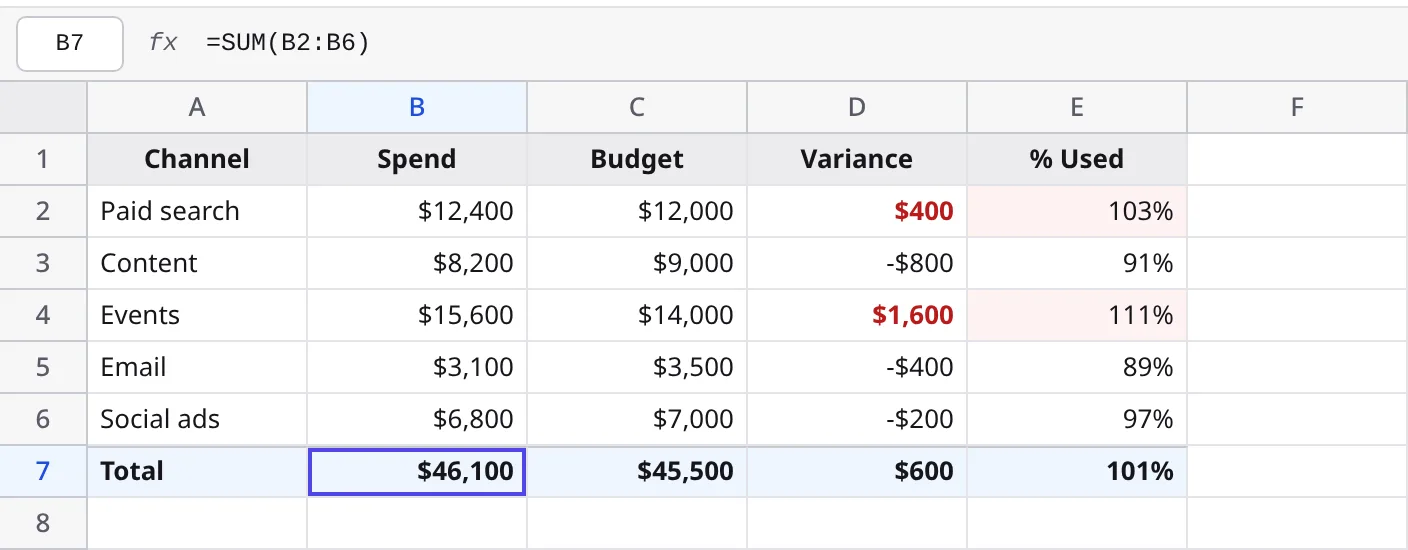
Spreadsheets
Spreadsheets, built in.
tela makes real spreadsheets — live formulas, conditional formatting and
number formats, with CSV and XLSX in and out. And because tela is agent-native, your agent
can build the whole sheet for you, from scratch: ask Claude or ChatGPT to "build a Q3
marketing budget — a row per channel with spend against each cap, a totals row, and flag
anything over" and it lays out the columns, writes the formulas, and styles it.
fxCSVXLSX
Agents build whole spreadsheets for you
Live formulas, conditional formatting & number formats
Import & export CSV and XLSX
Plain markdown you own underneath
Formulas compute at read time — never baked into stored numbers. Sheets are
live-collaborative (cursors and presence), and semantic search reads the computed
values, not the raw formulas.
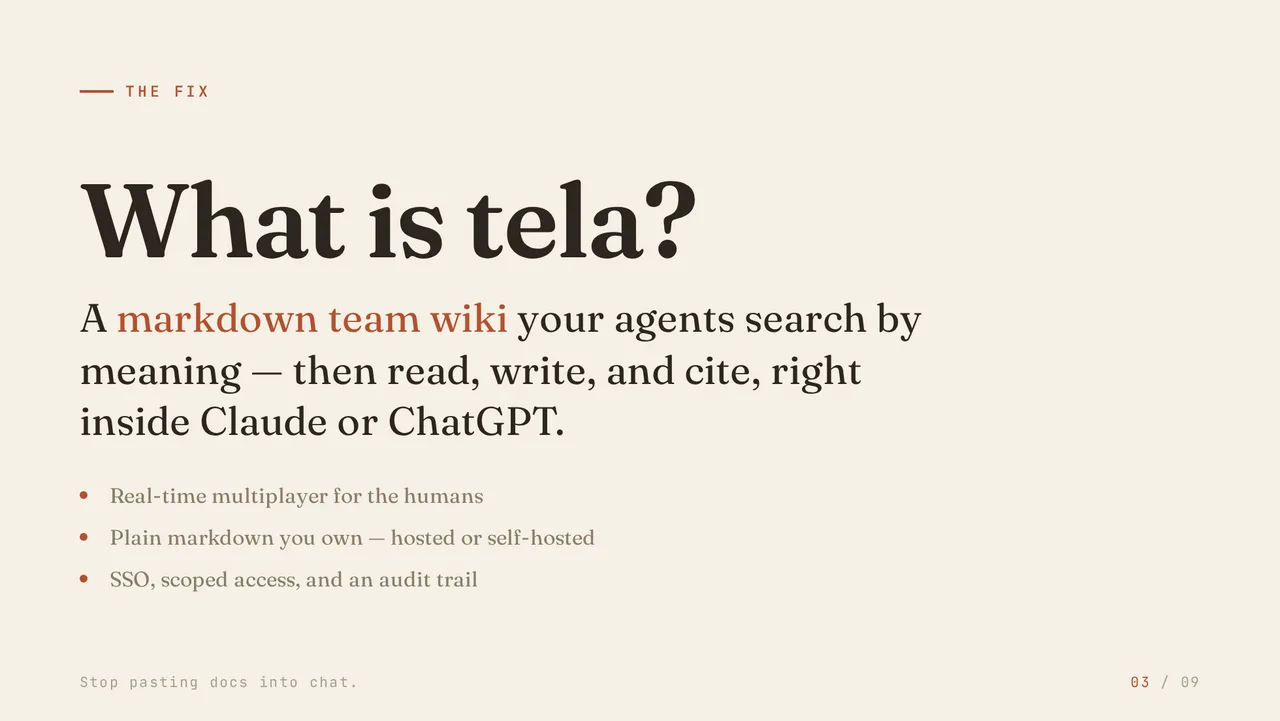
tela makes real presentations — present them live in the browser, or
export to PDF, PPTX or PNG. And because tela is agent-native, your agent can build the
whole thing for you: ask Claude or ChatGPT to "turn the launch notes into a 10-slide
talk" and it does.
PresentPDFPPTX
Agents build whole presentations for you
Present live — presenter mode, overview, draw
Export to PDF, PPTX or PNG
Plain markdown you own underneath
Slides are plain markdown underneath — portable like everything else in tela. Pick a
theme and accent; agents preview and fix their own slides before handing them over.
tela documents itself and your agents work it from Claude and ChatGPT — so the honest question isn't “which wiki,” it's how it differs from each tool you'd otherwise reach for, and the one thing each still does better.
Your docs write themselves — point Atlas at a repo or Jira project and it generates a cited, coverage-checked wiki — over plain markdown you own, that your agents read and write from Claude and ChatGPT. Not a closed block store with a chat sidebar bolted on.
Databases, templates, and all-round polish are years ahead. Want a relational workspace, not a wiki? Use Notion.
Atlas turns a git repo or a Jira project into a cited, coverage-checked wiki and keeps it fresh; agents search and write it by meaning; and it's portable markdown you can run yourself — no enterprise install, no per-seat pricing.
Deep two-way Jira workflow integration (tela documents from Jira; it doesn't drive Jira), granular permissions, and governance at thousand-user scale. Atlassian shops have reasons to stay.
Built for a team and for agents: Atlas-written docs, semantic retrieval, live multiplayer, SSO and roles, and an MCP connector — not a single-player vault you sync by hand.
Local-first single-user is its whole point; the plugin library and graph view are unmatched. Solo? Hard to beat.
Notion AI / “AI” wikis
tela generates the wiki from your sources and scores its coverage, then lets your own agent retrieve and write it from Claude or ChatGPT, over markdown you can export — a chatbot bolted onto a wiki does neither, and only works inside their app.
One-vendor convenience and a polished in-app assistant, with no embedder to think about. If you only want their chatbot, it's simpler.
Atlas generates and keeps cited docs current from your repo automatically; an MCP server so Claude can search and write pages natively; and fully self-hostable under AGPL with plain markdown output you control.
Developer-doc polish and multi-version publication for open-source libraries are its strong suit. Public-facing product docs with a clean public URL? GitBook is hard to beat.
Atlas turns a git repo or Jira project into a cited, coverage-checked wiki and keeps it fresh automatically; semantic search and ask-your-docs with paragraph citations; and an MCP server so agents are first-class team members alongside humans.
A polished, well-maintained self-hosted wiki with a strong community and a clean UI. If you want a great self-hosted wiki without AI generation, Outline is excellent.
None of them close the loop tela does: your sources become a cited, coverage-checked wiki,
your agents reason over and maintain it from Claude and ChatGPT, and it's all plain markdown
you own — with real-time editing and roles, and SSO and an audit trail on Enterprise.
Security & team
Built for a team you can trust it with.
Every space can be shared with your whole organization, opened to a specific team, or kept
private to you. People get owner, editor, or viewer access — and an agent connected
through Claude or ChatGPT can only ever see what your own account can.
Org-wide, a team, or private
Share a space with your whole organization, limit it to one group, or keep it private to you.
Agents stay in scope
An agent in Claude or ChatGPT only ever sees what your account can. It can’t reach a space you’re not in.
Roles per space
Give each person owner, editor, or viewer access. Access can be added but never silently lowered.
Single sign-on
Sign in with the SAML/OIDC SSO your team already uses (Enterprise). Accounts are email-verified.
Scoped agent keys
For code agents, each key is read-only or read-write, can expire, and can be pinned to one space.
Password-protected sharing
Public links can require a password and an expiry date. Every key request is logged.
Self-host it if you prefer
tela is open-source and runs on your own server with Docker Compose — your Postgres, your
disk, your data. Self-hosting is optional; the hosted instance is ready to use.
# your server, your data
cp deploy/.env.example deploy/.env
docker compose up
Honest caveats: orgs are admin-provisioned (not open self-service signup) and social login
isn't wired yet — by design for now. The access model is documented and the auth code is open.
Publish
Your wiki doubles as a public site.
Flip a space to public and it becomes a no-login, magazine-style blog — your
docs, changelog, or handbook on the open web, with RSS and SEO built in. Same plain markdown
underneath; nothing duplicated, nothing exported.
EEngineeringHow we build and run tela.RSS
PJun 6 · 4 min · incidentPostmortem: the cache stampedeWhat broke, why p99 tripled, and the guardrail we shipped.May 28 · 6 min · rfcRFC: hybrid retrievalFusing keyword and vector search over heading-aware chunks.
No-login public reader
RSS feed per space
OG, JSON-LD & sitemap for SEO
Author home at /u/handle
Read-only by design — making a space public grants no write access. Owner flips it on; flip it back anytime.
Pricing
Simple plans. Your markdown either way.
One ladder, the whole product on every tier — Atlas, semantic search, ask-your-docs, and the agent connector.
Paid tiers raise your AI — how many sources Atlas keeps fresh, how much indexing time a month, and how many answers — and add team controls.
Managed AI is included on every cloud plan.
Flagship
Atlas is on every plan — point it at a git repo or Jira project and it
writes a cited, coverage-checked wiki and keeps it fresh. Paid tiers raise how much you
can generate.
Bring your own agent — ask unlimited. The monthly answer counts meter
tela's built-in AI. Connect Claude, ChatGPT, or any MCP agent and it runs on your model,
on your tokens — no limit, same wiki. Semantic search stays fair-use on every plan.
No card to start — every new account gets a 30-day Personal trial, then settles onto your plan.
Every plan includes
Atlas — generate & refresh a cited, coverage-checked wiki from a git repo or Jira project
Semantic search + ask your docs, with citations
Bring your own agent (Claude, ChatGPT) over MCP — ask unlimited, on your model
Local folder sync over WebDAV
Real-time multiplayer editing
Organizations & per-space roles
Plain markdown you own — export anytime
Or run it yourself — free
tela is open source (AGPL). Self-host the whole product — Atlas, search, agents, sync —
and bring your own AI. Community is free forever; Enterprise adds SSO, audit and governance.
tela is at v0 and usable today. No fabricated logos, no "trusted by thousands" —
just the code, a running instance, a connector you can add, and a spec you can read.
Questions
Straight answers.
Do I have to write all the docs myself?
No. Point Atlas at a source — a git repo or a Jira project — and it reads the source, drafts cited markdown pages, scores them against the source’s real surface (a coverage %, with the gaps named at file:line), and publishes them as ordinary tela pages. Two source types today; more coming. You can still write and edit pages by hand alongside the generated ones.
What happens when my code changes?
Atlas probes each source for drift about every 15 minutes (a cheap no-clone check) and regenerates on a schedule you set — daily, weekly, monthly, or off — rebuilding only the sources that actually changed (a delta run over the changed files). Generated pages are the machine-maintained layer, so a re-run rewrites them. Atlas needs an LLM and an embedder — both on for the hosted instance; bring your own on self-host.
Does it work inside Claude and ChatGPT?
Yes. tela runs a remote MCP server with OAuth sign-in; add it as a connector in Claude or ChatGPT (it’s submitted to both directories) and your agent searches, reads, and writes your wiki — scoped to your account. Code agents like Claude Code or Cursor point at the same URL with a token.
How is search different from a normal wiki?
tela ranks results by meaning as well as by keyword, so a search returns the section that answers your question even when it doesn’t contain the exact words. Your team searches from the command palette; Claude and ChatGPT search the same way through the connector and get a link back to the source.
Can it answer questions, not just find pages?
Yes — that’s “ask your docs”. Ask in plain language and tela retrieves the relevant sections and writes an answer with citations to the source pages, grounded only in what your account can read. If your docs don’t cover it, it says so instead of inventing an answer. Agents ground their answers the same way through the connector.
Do I need to run anything extra for that?
Only if you self-host. Meaning-based search needs an embedding model, and ask-your-docs also needs an LLM — point tela at your own of each (the hosted instance has both set up). Keyword search always works on its own.
Is it really markdown, with all that block editing?
Yes. The editor is full block editing — drag, slash menu, turn-into, tables, diagrams — but pages.body is plain markdown. There is no block table; reordering a block reorders markdown lines. Import a directory, export anytime.
Can I edit in my own editor — Obsidian, VS Code?
Yes. Mount a space as a local folder over WebDAV and sync it with rclone, then edit the files in any editor you like. Pages round-trip as plain markdown and non-markdown files (images, PDFs, diagrams) sync too — so your local folder and tela stay in step both ways.
How do agents sign in?
Through the Claude and ChatGPT connectors they sign in once with OAuth — no token to handle. For code agents like Claude Code or Cursor, you create an access key that’s scoped to read or write, can expire, and can be limited to a single space.
Is my team’s data access-controlled?
Yes — organizations and groups, per-space roles (owner / editor / viewer) with hard invariants, and scoped API keys. SSO (SAML/OIDC) and the audit log are Enterprise features. The access model is documented and open.
What does it cost?
There’s a free tier for personal use and for small teams, paid Personal and Team tiers above them, and Enterprise for scale — or self-host it free. Tiers change your built-in AI limits (Atlas sources, monthly indexing time, and monthly answers) and whether Atlas refreshes on a schedule — never the product itself. Bring your own agent over MCP and it’s unlimited on any tier, including Free. Every new account starts on a 30-day Personal trial. Full breakdown on the pricing page.
Can I self-host it?
Yes. It’s open and self-hostable with Docker Compose (Postgres, plus an optional embedder for semantic search and an LLM for ask-your-docs). Your data on your disk, your markdown exportable. Self-host is the option, not the requirement — the hosted instance is ready to use now.
Connect your wiki to Claude and ChatGPT.
Start free on the hosted instance, or self-host it yourself.